
팬플러스에 대하여
001. 콘텐츠 또는 계정 신고방법.
1. 신고 접수 절차
신고가 접수된 콘텐츠 또는 계정에 대해 다음과 같은 단계에 따라 절차가 진행됩니다.
신고 접수 → 관리자 검토 → 정책 위반 콘텐츠 및 계정에 대한 조치
1) 신고 접수 절차에 따라 신고유저 또는 신고된 유저의 계정 주소로 안내 메일이 발송됩니다. 메일 주소가 만료되거나 받은편지함 용량을 초과하는 등의 사유로 메일 수신이 불가하여 생기는 문제에 대해 팬플러스는 책임을 지지 않습니다.
2) 정책 위반 콘텐츠 및 계정은 운영정책에 따라 처분이 이루어집니다.
3) 정책 위반 콘텐츠 및 계정에 대한 조치가 이루어지기까지 최대 30일까지 소요될 수 있습니다.
4) 정책 위반 조치에 대한 내용은 운영정책에서 확인할 수 있습니다.
이용약관 및 운영정책: 어플 홈 - 설정 - 기타 - 이용약관 및 운영정책
5) 관리자 검토 후 정책 위반 내용이 확인되지 않는 신고 내역은 허위 신고로 분류됩니다. 허위 신고자는 운영 정책에 따라 처벌될 수 있습니다.
2. 신고하기
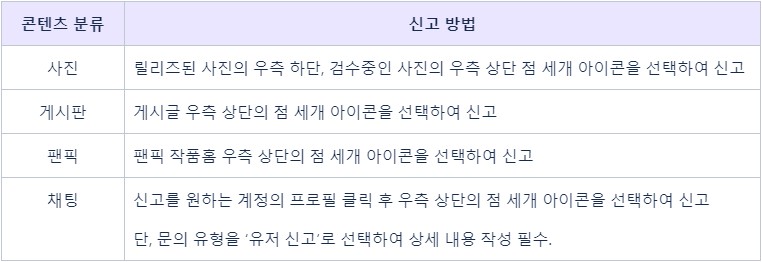
정책에 대한 잠재적 위반 사항을 ‘콘텐츠(게시글, 댓글, 팬픽 등) 신고 버튼 - 신고 사유'를 선택하거나 '유저 프로필 - 우측 상단 신고 버튼 - 문의하기’로 이동하여 상세 내용을 작성하는 방법으로 신고를 접수할 수 있습니다.
1) 콘텐츠 신고
관련 정책을 위반할 여지가 있다면 다음과 같은 방법으로 신고할 수 있습니다.
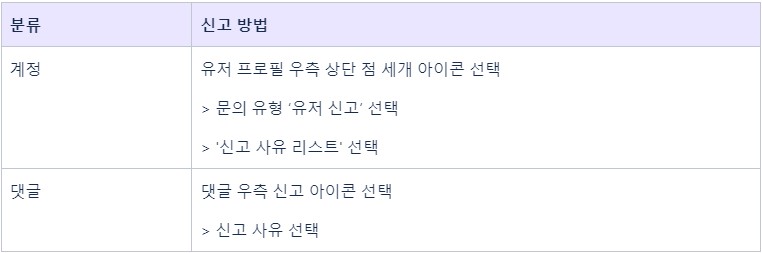
2) 계정/댓글 신고
관련 정책을 통해 제한하는 불량 계정 및 댓글에 대해 다음과 같은 방법으로 신고할 수 있습니다.
3. 유의사항
1) 유저 프로필에서 신고 버튼 눌러 신고하는 경우, 문의하기로 이동하여 접수하게 됩니다. 이때 문의 유형을 ‘유저 신고’로 선택하여 상세 내용을 작성해주셔야 정상적으로 신고 접수가 완료됩니다.
2) 신고 사유는 한 가지만 선택할 수 있습니다. 다수의 항목을 위반하더라도 해당하는 항목 중 한 가지만 선택해 주세요.
4. 허위신고
1) 정책에 대한 잠재적 위반 내용으로 보기 어렵거나 정책 위반 사유 항목에 적합하지 않은 내용을 신고하는 활동, 상세 내용을 작성하지 않고 신고하는 활동 등은 모두 허위신고로 간주됩니다.
2) 관리자가 신고 내역을 검토한 후 허위신고로 판단될 경우, 허위신고 건수에 따라 경고가 누적됩니다.
3) 경고가 누적되면 운영정책에 따라 처벌될 수 있습니다.
__________
1. Steps to Report
Steps to process contents/accounts must be followed as below:
Receiving a report → Internal Check → Taking action on the reported content/account
1) In accordance with the reporting process, a notification email will be sent to the reporter or the reported user's account email address. Fan Plus is not responsible for any problems caused by the inability to receive e-mails due to the e-mail address expiring/deactivation or exceeding the inbox capacity.
2) Content/account that violates the policy will be processed according to FanPlus operation policy.
3) It may take up to 30 days to take action on the reported content/account.
4) You can check the FanPlus operation policy on FanPlus app.
FanPlus Settings > More > Terms of use and operation policy
5) If the reported content/account did not violate any policy, the report will be considered a false report. False reporters may be penalized according to FanPlus operation policy.
2. How to Report?
You can send a report on a content page (board post/comment, fanfic, etc.) or a user’s profile.
- Click “Report” button on a content → Select the reason for the report
- Click “Report” button on a user’s profile → Go to the next page to send an inquiry
1) Report a content
Please check the guide below and report in case of a need.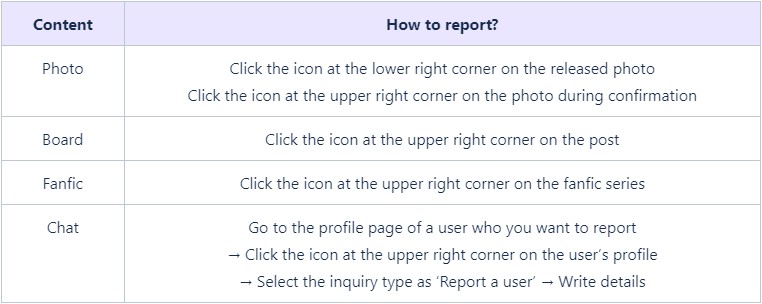
2) Report an account or a comment
Please check the guide below and report in case of a need.
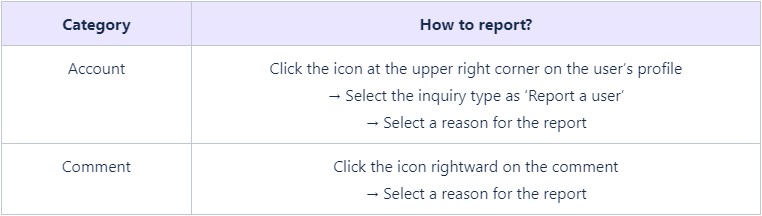
3. Cautions
1) Once you click “Report” button on a user’s profile, you will move to “Contact us” page. You must select “Report a user” as an inquiry type, so the report can be processed.
2) You can choose only one reason for the report. Although the content/account violates several policies, you must choose one from the listed violation types.
4. False Reports
1) Please check the criteria of false reports below:
- If the content/account did not violate any policy
- If you chose the wrong reason for report the content/account
- If you sent the report with an insufficient description of the violation
2) If FanPlus team reviews the report and determines that it is a false report, the reporter will get a warning according to the number of false reports.
3) If warnings are accumulated, you may be penalized according to FanPlus operation policy.

![[TALK] 카톡왔숑! thumbnail](https://cdnetphoto.appphotocard.com/fanfic/1270274/93150/thumbnail_img_20240306041153.png)

![[TALK] 무관심한 오빠들 동생바보 만들기 thumbnail](https://cdnetphoto.appphotocard.com/fanfic/2504031/208888/thumbnail_img_20210401235738.jpg)


![[talk] 연화대 톡 thumbnail](https://cdnetphoto.appphotocard.com/fanfic/2149406/194614/thumbnail_img_20210218205850.jpg)